Feature
How to blur part of a screen recording
Updated
In short
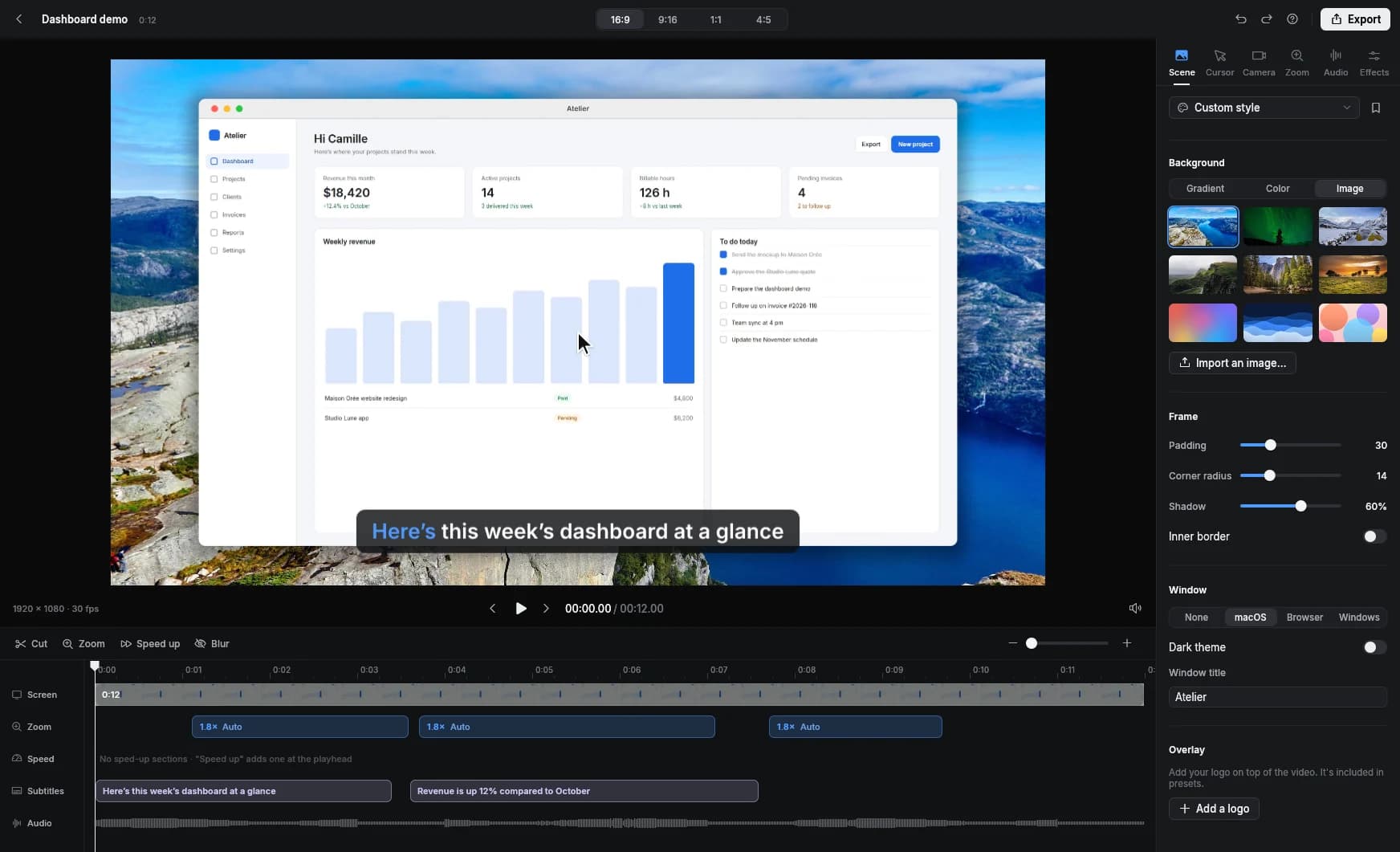
To blur part of a screen recording, place a mask over the sensitive area (password, email address, customer name) starting when it appears. In Clarcut, the timeline's Blur tool lets you blur or pixelate an area without leaving the editor, and it's in the free version. For passwords or numbers, use Pixelate instead of a light blur, and watch out for zooms, browser tabs and anything you say out loud.
What to blur in a screen recording
The best protection is never showing this information in the first place: a demo account, fake data, notifications off. Blurring is your safety net for whatever slips through.
- Passwords, verification codes, API keys and access tokens.
- Email addresses, names and phone numbers of customers or coworkers.
- Amounts, invoices, banking details, order numbers.
- Notifications that pop up while you're recording (chat, email).
- Tabs, bookmarks and the address bar, which can reveal internal tools or private URLs.
- Your username in a corner of the app or in a folder path.
How to blur an area in Clarcut, step by step
- 1
Find the moment the info appears
Play the video in the editor and stop just before the sensitive data shows up.
- 2
Add a mask from the timeline
Pick Blur in the timeline. The mask applies from that moment on.
- 3
Draw the area to cover
Leave some margin: a field that grows as you type needs to stay covered.
- 4
Choose blur or Pixelate
Blur keeps the look of the interface; Pixelate leaves nothing readable. For passwords, use Pixelate.
- 5
Set the duration on the timeline
Make sure the mask covers the whole time the info is visible, including during zooms.
- 6
Scrub frame by frame around the mask
Info that appears a split second before the mask is still readable on pause.
Prep your screen so there's less to blur
- Use a demo account with fake but realistic data (made-up names, example.com addresses).
- Turn on Do not disturb on Windows or a Focus mode on Mac to block notifications.
- Open a clean browser window with no bookmarks or personal tabs, or a browser profile just for demos.
- Sign in before you start recording so no password ever shows on screen.
- Record a window instead of the full screen: the taskbar, Dock and other windows stay out of frame.
- Quit chat apps that show message previews.
Blur or Pixelate: which to use
| Data | Blur | Pixelate | Why |
|---|---|---|---|
| Password, code, API key | Short text under a light blur can sometimes be guessed. | ||
| Email address, customer name | A strong blur is usually enough; a Pixelate is safer. | ||
| A list of data (spreadsheet, CRM) | Blur keeps the layout visible so the video still makes sense. | ||
| Unexpected notification | Depends on the content: mask it if it shows a private message. | ||
| Someone else's face or image | Blur looks less jarring on screen. |
Slip-ups that leak information anyway
- Zooms: an automatic zoom can enlarge the blurred area. Rewatch zoomed sections to make sure the data stays covered.
- Your voice: if you read an email address out loud, it'll end up in the captions and in a share link's transcript. Edit the caption text or cut that part.
- On-screen keystrokes: if keyboard shortcut display is on, make sure it isn't showing a typed password. When in doubt, turn it off for that section.
- The window title: a file or customer name in the title bar. Clarcut can hide the recorded window's title bar.
- The first and last frames: they're often used as thumbnails. Check them.
- Scrolling content: if the data moves on screen (a scrolling list), the area needs to cover its whole path, or be split into several masks.
The limits of blurring in Clarcut
Clarcut's mask covers an area of the screen starting at a given moment. It doesn't automatically follow a moving element the way motion tracking does in a video editor. For screen recordings, that's rarely an issue since interfaces don't move much. If some data moves around a lot, make the area bigger or add several masks in a row.
Clarcut also doesn't detect sensitive data on its own: it's up to you to spot what needs hiding.
Other ways to blur part of a video
| Tool | Free | Tracks a moving element | What to know |
|---|---|---|---|
| DaVinci Resolve | Blur inside a shape (Power Window) with tracking: precise, but technical. | ||
| Premiere Pro | Mosaic or blur effect with a tracked mask, as part of an Adobe subscription. | ||
| Clipchamp (Windows) | Blur effects apply to the clip; hiding one small area is less straightforward. | ||
| iMovie (Mac) | No simple tool to blur just one area of the frame. | ||
| Clarcut | Blur or mask an area right in the editor, from a set moment, without exporting to another app. |
To blur a moving face in camera footage, a tool with motion tracking like DaVinci Resolve is the right choice. To hide a form field or an email address in a demo, Clarcut's tool does the job and saves you a round trip between apps.
Frequently asked questions
How do I blur part of a video for free?
In Clarcut, add a mask from the timeline, draw the area and choose Blur or Pixelate. It's included in the free version. DaVinci Resolve, also free, can blur a moving element with tracking, but takes more steps.
How do I hide a password in a video tutorial?
Use Pixelate instead of a light blur, cover the whole field with some margin, and check zoomed sections. Better yet, type the password off camera or use a demo account.
Does the blur follow a moving element?
No, Clarcut's mask covers a fixed area of the screen starting at a given moment. If the element moves, make the area bigger or add several masks.
Can blur be removed after export?
No. Once exported, the blur is part of the image. In your Clarcut project, though, you can edit or delete the mask anytime before exporting again.
Can blurred text be recovered?
A light blur on short text can sometimes leave the characters guessable. For truly sensitive data, use a Pixelate.
Are my videos uploaded to be blurred?
No. All editing, blurring included, happens on your computer. Nothing is uploaded unless you create a share link.